Done 999 Deposit: How to Add Cash With JazzCash or Easypaisa
Adding money to Done 999 takes about a minute, but the last step catches almost everyone out. The payment is not approved inside the game. You have to switch to your wallet app and approve it there, and until you do, no credits show up.
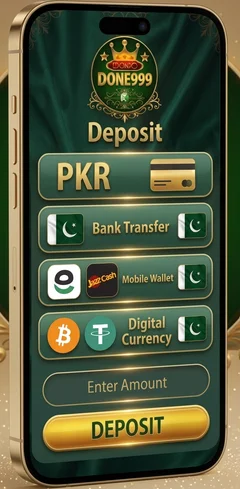
- 1Tap Deposit
- 2Approve in your wallet app
- 3Credits added
Quick Summary
- Payment methods
- JazzCash and Easypaisa (bank transfer is also listed in the app)
- Currency
- PKR (Pakistani rupees)
- Where you start
- Profile section, then Deposit
- Where you approve
- Your wallet app: Settings, then App Approvals
- What you receive
- Credits in your Done 999 account
Done 999 Deposit Guide: Step by Step
Six steps, in order. Each takes a few seconds.
- 1Open the Done 999 app on your phone.
- 2Go to your Profile section. The Deposit option is there.
- 3Tap Deposit, then link a local payment account such as JazzCash or Easypaisa.
- 4Once the account is linked, enter the amount in PKR you want to deposit.
- 5Open your wallet app, go to Settings, then App Approvals, and approve the payment there.
- 6Your credits land in your Done 999 account and you can start playing.
Step 5 is where deposits stall. The approval happens in your wallet app, not inside Done 999. You have to switch apps to finish the payment.
Not signed up yet? Start with the guide to login to your Done 999 account. Want the app first? Read the Done 999 APK download guide.
Can I use a different wallet for deposits?
Yes, you can use different accounts. One for withdrawals, another for deposits. You can also use the same account for both. Most players stick with one wallet because it is simpler to track, but nothing stops you from splitting them.
Deposit Methods in Done 999
Two mobile wallets handle almost every deposit on the platform. Both work the same way, and both need that final approval step in the wallet app.
Deposit with JazzCash
Pick JazzCash when you link your payment account in step 3. Then open the JazzCash app, go to Settings, then App Approvals, and approve the payment.
Deposit with Easypaisa
Same route. Pick Easypaisa in step 3, then approve in the Easypaisa app under Settings and App Approvals.
Bank transfer
Bank transfer is listed as a deposit option too. The steps on this page cover the two mobile wallets, since those are what most players use.
Worth knowing: bank transfer is deposit-only. Withdrawals go to JazzCash or Easypaisa, so you will need one of those wallets anyway when it comes time to cash out.
Common Done 999 Deposit Problems and Fixes
Most deposit trouble comes down to one missed step. Find the one that matches what you are seeing.
You cannot find the Deposit option
It sits in your Profile section, not on the game screens. Open the app, tap Profile, and it is listed there.
You have not linked a payment account
Tap Deposit first. The app asks you to link a wallet before anything else. The amount box only appears once that account is linked.
Your credits have not arrived
You probably have not approved the payment yet. Open your wallet app, go to Settings, then App Approvals, and approve it there. Credits are added after that approval, not before.
If you have approved it and the balance still has not moved, check that the payment actually left your wallet. A failed approval sometimes looks like a successful one. When money has gone out but no credits arrived, contact customer support in the app with the amount, the time, and a screenshot from your wallet.
You typed the wrong amount
Read the PKR figure again in step 4 before you leave for your wallet app. Catching it in Done 999 is far easier than sorting it out afterwards.
Your wallet does not have enough balance
The approval will fail if the amount is more than what sits in your JazzCash or Easypaisa account. Check your wallet balance first, then start the deposit.
Frequently Asked Questions
Where is the Deposit option in the Done 999 app?
In your Profile section. Tap it and the app asks you to link a wallet such as JazzCash or Easypaisa, then to enter the amount in PKR.
Which wallets can I use for a Done 999 deposit?
JazzCash and Easypaisa. Bank transfer is also listed in the app as a separate option.
Where do I approve the deposit payment?
In your wallet app, not in Done 999. Go to Settings, then App Approvals, and approve it there.
Can I deposit with a different wallet from the one I withdraw to?
Yes. Link whichever account you want to pay from in step 3. It does not have to match your withdrawal wallet.
What currency does a Done 999 deposit use?
PKR. Every amount you enter is in Pakistani rupees.
How long does a Done 999 deposit take?
Credits are added once you approve the payment in your wallet app. If nothing shows up after that approval, check the troubleshooting section above.
Ready to Deposit?
Open the app, tap Profile, then Deposit. Link your wallet, enter the amount, approve it in the wallet app, and your credits are waiting.
Add only what you are comfortable playing with. Ourresponsible gaming tips cover a simple way to set a limit before you start, and players must be 18 or older.
Curious about rewards on your deposits? Seehow Done 999 bonuses work. When it is time to take money out, follow theDone 999 withdrawal guide.